


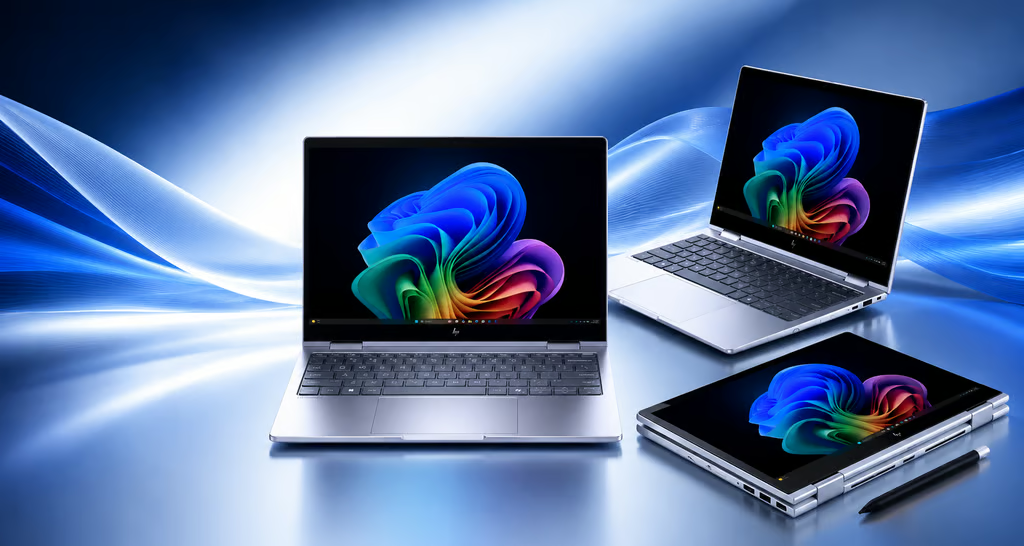
HP’s Intel-powered EliteBook, ProBook, and EliteDesk PCs provide IT teams with greater flexibility across AI capabilities, mobility, and device management.
The traditional office desk is no longer the standard environment for business computing.
HP’s 2026 commercial PC lineup features Intel-powered laptops, convertibles, and desktops designed for employees who work across meeting rooms, home offices, client locations, and shared workspaces. Unveiled at HP Imagine 2026, the range includes Intel-based configurations across the EliteBook, ProBook, and EliteDesk families, offering solutions for enterprise organizations, growing businesses, and traditional office environments.
For IT teams preparing to upgrade their hardware, the choice involves more than processor performance. Factors such as form factor, on-device AI capabilities, security, connectivity, manageability, and the ability to maintain consistent hardware standards across different employee roles can all influence the right system for the organization.
How HP Organizes Its PC Lineup for Different Workstyles
HP has structured its commercial PC portfolio around different employee needs and workplace environments. The EliteBook 8 G2 Series is aimed at knowledge workers and creators who regularly switch between individual productivity and collaborative tasks. For users who need more flexibility, the Intel-powered EliteBook 8 Flip G2i features a 13-inch convertible design that can operate in laptop, tablet, tent, and stand modes. It also includes a built-in pen for note-taking and screen annotation.
According to HP’s support documentation, the EliteBook 8 Flip G2i is available with Intel Core Ultra 5 and Core Ultra 7 processors, along with up to 64GB of LPDDR5x memory and 2TB of SSD storage. Connectivity options include Thunderbolt 4, HDMI 2.1, Wi-Fi 7, Bluetooth 6, and optional 5G, although the available features vary by configuration.
The EliteBook 6 G2 Series is designed to accommodate small businesses, enterprise organizations, and public-sector environments. Its broader configuration options can help IT departments standardize hardware across different employee roles and deployment requirements.
For growing small and midsize businesses, HP positions the ProBook 4 G2 Series as a more accessible option. The Intel-powered ProBook 4 Flip G2i brings touchscreen and tablet-style functionality to the lineup, giving users added versatility without moving into the premium EliteBook range.
The EliteDesk 8 G2 Series, meanwhile, is focused on traditional desktop deployments. HP says these systems combine local AI acceleration with hardware-based security features, HP Wolf Security for Business, and multiple form factors. This makes the range suitable for offices where manageability, security, and efficient use of workspace are more important than portability.
Across the wider Imagine 2026 portfolio, HP has emphasized simplifying device management as employees move between different locations and work environments. Bruce Broussard, HP’s interim chief executive officer, described the company’s approach as an effort to make work simpler as workplace technology becomes increasingly complex.
Here’s a polished rewrite that keeps the technical details accurate while making the flow more natural and editorial:
What Intel Core Ultra Series 3 Brings to Business PCs
Intel’s Core Ultra Series 3 processors are designed to balance performance and power efficiency by combining performance cores, efficiency cores, and low-power efficiency cores with an integrated neural processing unit (NPU). Supported processors can deliver up to 50 NPU TOPS, while select models also support Intel vPro technologies aimed at managed business environments.
However, not every feature is available on every PC.
Intel says capabilities such as Arc graphics, Wi-Fi 7, Intel Evo certification, and certain AI functions can vary depending on the processor, system design, software, and regional availability. For IT departments, that makes it important to evaluate individual configurations rather than assuming that every model in a product family offers the same feature set. Processor options, graphics capabilities, connectivity, and management features may differ significantly between configurations.
What IT Buyers Should Look For
HP announced in March that the EliteBook 8 G2, ProBook 4 G2, and EliteDesk 8 G2 families were expected to begin shipping in April, with the EliteBook 6 G2 scheduled to follow in June. The EliteBook 8 Flip G2i is now listed through HP’s online store, although pricing, availability, and specifications can vary depending on the configuration.
When evaluating these systems, IT teams should look beyond the processor name and compare factors such as processor tier, memory, storage, vPro support, wireless connectivity, display configurations, and device-management requirements.
Local AI performance also depends on the specific processor and software environment. Some AI capabilities may require additional software, subscriptions, platform support, or configuration, while Wi-Fi 7 requires compatible hardware, operating-system support, and network infrastructure.
Before adopting a single model across an organization, IT buyers should match each configuration to the workloads employees actually perform. Battery life, thermal performance, warranty and support terms, and compatibility with existing deployment tools should also be evaluated once final systems are available for independent testing.
I can also make this section more concise and news-style to match the earlier HP article sections.
Here are 9 SEO-friendly FAQs for the article:
Frequently Asked Questions
What is Intel Core Ultra Series 3?
Intel Core Ultra Series 3 is a processor family designed to balance performance and power efficiency while adding integrated AI acceleration through a neural processing unit (NPU).
How much AI performance can Intel Core Ultra Series 3 provide?
Supported Core Ultra Series 3 processors can deliver up to 50 NPU TOPS, although actual AI performance depends on the specific processor and software being used.
Do all HP business PCs include the same Intel features?
No. Features such as Arc graphics, Wi-Fi 7, Intel Evo certification, vPro support, and certain AI capabilities vary by processor and system configuration.
Which HP business PC families use Intel processors?
HP offers Intel-powered configurations across several commercial families, including EliteBook, ProBook, and EliteDesk systems.
What is Intel vPro used for in business PCs?
Intel vPro provides features designed for business environments, including enhanced security, remote management, and system-management capabilities on supported configurations.
Does Wi-Fi 7 come standard on every HP business PC?
No. Wi-Fi 7 availability depends on the specific PC configuration and requires compatible hardware, operating-system support, and Wi-Fi 7 networking equipment.
What should IT teams consider when buying HP business PCs?
IT teams should compare processor performance, memory, storage, graphics, vPro eligibility, wireless connectivity, display options, AI capabilities, security features, and device-management requirements.
Can Intel Core Ultra Series 3 improve local AI workloads?
Yes. The integrated NPU is designed to accelerate supported AI workloads locally, but the available capabilities and performance depend on the processor, software, and overall system configuration.
Should businesses standardize on one HP PC model?
Not necessarily. Businesses should match each PC configuration to employee workloads and consider factors such as mobility, battery life, thermal performance, security, manageability, support, and compatibility before standardizing their hardware.
Here’s a concise, SEO-friendly conclusion that fits the article’s professional tone:
Conclusion
HP’s 2026 Intel-powered business PC lineup is designed to address a wider range of workplace needs, from mobile and hybrid employees to traditional office deployments. The EliteBook, ProBook, and EliteDesk families offer different combinations of performance, mobility, AI acceleration, security, connectivity, and manageability.
For IT teams, choosing the right system means looking beyond processor specifications. Individual configurations can differ in memory, storage, wireless features, vPro support, and AI capabilities, making workload requirements an important part of the buying decision. By matching each device to employee needs and evaluating long-term management and support requirements, organizations can build a more flexible and practical PC strategy for modern work environments.
